
Try it
Ask in plain words. Your assistant picks the tools.
- Who undercut me this week?
- Prepare the Q2 pricing review
- Check the price of <product>
Ready-made workflows
Claude Code: /pricemind:<name>. Codex: type $ and pick one. Other clients: pick it from the prompt menu.
- Set up Pricemind
setupStart hereCheck the connection, pick a channel, explain what Pricemind can do, and suggest three first questions.
- Weekly pricing review
weekly-reviewLast week's competitor price moves, position gained or lost, new out-of-stocks and the top 10 products to act on.
- Management pricing report
management-reportPeriod-over-period review: price index, position by brand and category, and competitor activity, in a fixed structure.
- Promotion watch
promo-watchWho started cutting prices, how deep, since when, and in which categories.
- Price check for one product
price-checkOne product: your price, every competitor's price and stock, price history, and match-quality warnings.
- Own brand vs market
own-brand-vs-marketOwn-brand products against the cheapest comparable branded product, on channels with product groups.
How it behaves
Your assistant asks once per job, never per step.
Never asks.
Search, prices, matches, previews, explanationsDone when you ask, then reported with how to undo.
Match an offer, attach, add a comparable, start a crawlOne approval for the whole plan.
Unmatch, detach, remove a comparable, create or update a pricing strategyThe only other stop is decision_required: a material warning, a changed version, a wider scope or a missing permission. Nothing was changed, and the assistant asks you once.
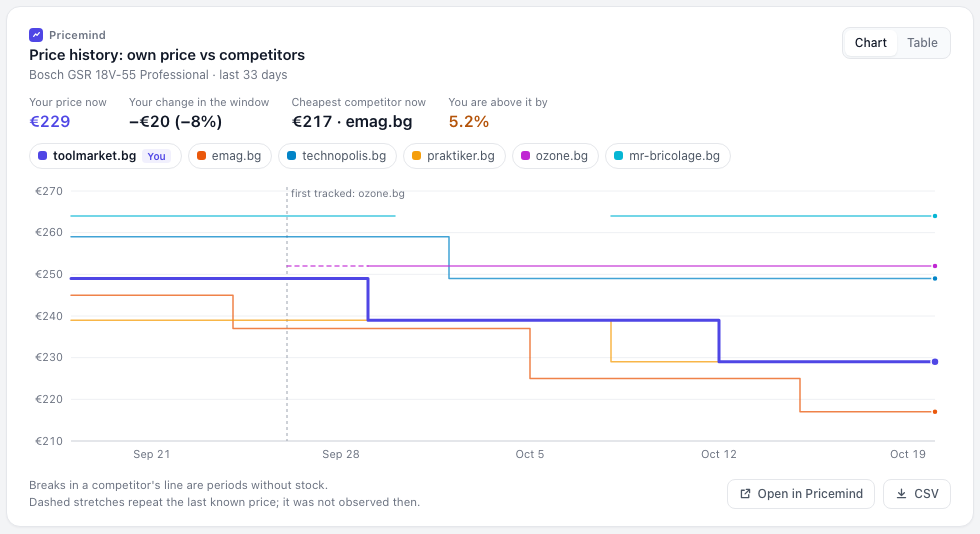
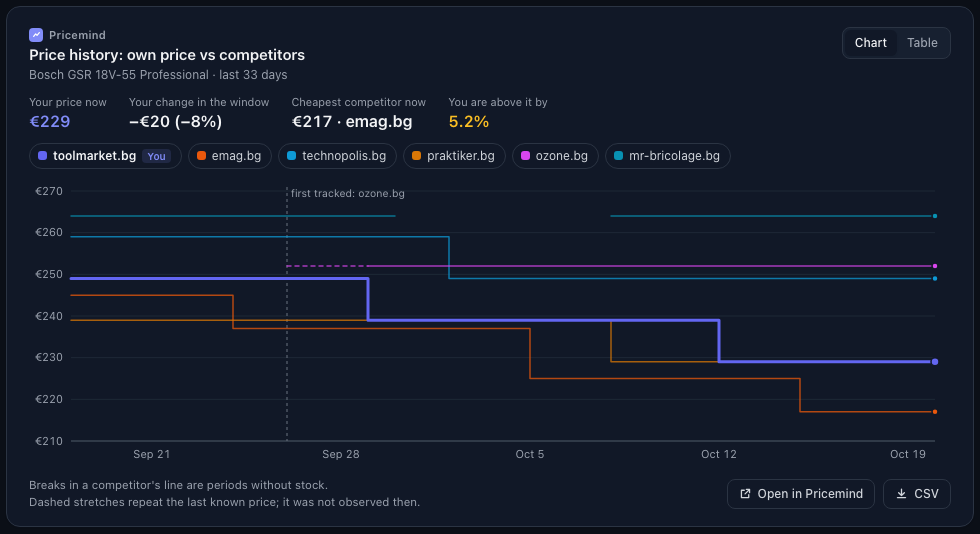
Charts
Reference
Connect with an API keyFor scripts, unattended agents and clients without sign-in
1. Choose capabilities
A key can do only what you select when you create it, and capabilities are fixed when the key is issued. Select every workflow the agent needs now. Pricemind adds MCP connection access and all prerequisite capabilities automatically.
searchproduct-discoverymatching-analysispricing-strategiescrawl2. Create the key
- An account administrator opens a channel in the Pricemind app → Integrations → API Keys → Create MCP key. The key belongs to the account, not the channel.
- Give it a unique name per client and environment, such as
codex-prod-v1. - Copy the one-time secret into your secret manager and inject it as
PRICEMIND_MCP_API_KEY.
3. Configure the client
Send the key in exactly one Authorization: Bearer … header. Do not use X-API-Key, and never put a key in a URL.
# PRICEMIND_MCP_API_KEY is injected by your secret manager

codex mcp add pricemind \
  --url https://mcp.pricemind.io/mcp \
  --bearer-token-env-var PRICEMIND_MCP_API_KEY

codex mcp get pricemind --json
Claude web and desktop: use sign-in, not a static Bearer key. Do not paste a key into a URL or claude_desktop_config.json.
Change access or rotate a key
Keys are not edited in place. Replace them without downtime:
- Create a replacement MCP key with a new unique name and every capability it needs.
- Switch the client to the new secret and reconnect.
- Check that the expected tools appear and a read works.
- Only then revoke the old key. Revocation is immediate.
If a key may be compromised, revoke it at once instead.
Existing IP-restricted API keys cannot connect through MCP. MCP keys created in the app are ready to use. Keep IP allowlists on direct Core API credentials.
ToolsetsShow the assistant fewer tools for a focused job
A toolset hides tools to keep the assistant focused. It never grants access: a session still sees only what its sign-in or key allows. Add ?toolset=<id> to the server URL. Change it any time; no replacement key is needed.
allGeneral agents that move between search, discovery, matching, pricing, and crawls.product-discoveryResearch and assortment-comparison workflows.matching-analysisEvidence review without mutation tools in the model context.matching-operatorSessions that must operate matching, not only analyze it.pricing-strategiesFocused pricing policy design and maintenance.crawlSmall-context crawl operations and diagnostics.searchPrice intelligence and reporting assistants.Only all (the default) publishes the workflow prompts.
Changes, batches and retriesWhat the server does when your assistant changes data
- One call per change.
*_execute_*tools take the exactintent, a stableidempotency_keyand optionalacknowledgementsfor warnings you already accepted. - Batches. Batch tools take 1–25 items and return one summary with how to undo.
- Previews are for when you want to see a change without making it.
- Retries. Reuse an idempotency key only for the same command; a retried batch does not repeat items that already ran. Changed intent needs a new key.
- Audit. Changes are recorded as authorized execution, never as human-confirmed. Approval prompts from your MCP client are separate from these rules.
executedChanged by this call.already appliedAlready in the requested state, for example on a retry; nothing changed again.needs a decisiondecision_required: not changed. Ask once about these items only.failedRejected; not changed.unverifiedThe outcome is unknown, so the batch stopped. Read state, then retry with the same idempotency_key.not attemptedSkipped after the batch stopped. Retry with the same idempotency_key.Account boundaryWhose data a connection can reach
A sign-in or key belongs to one Pricemind account and lists that account's channels. Channel tools use channel_id as the boundary and accept no account selector. Pricemind staff use a separate, approved, time-limited profile for cross-account work; customer-created keys cannot select or gain that access.
Check the connection by handA raw request for network or key problems
Your client does this by itself. Use it only to isolate a network or key problem, with the key already in your environment, not in shell history.
# PRICEMIND_MCP_API_KEY is already injected by your secret manager

test -n "$PRICEMIND_MCP_API_KEY" || {
  echo "PRICEMIND_MCP_API_KEY is not set" >&2
  exit 1
}

curl --fail-with-body --silent --show-error --request POST https://mcp.pricemind.io/mcp \
  --header "Authorization: Bearer $PRICEMIND_MCP_API_KEY" \
  --header "Content-Type: application/json" \
  --header "Accept: application/json, text/event-stream" \
  --data '{
    "jsonrpc": "2.0",
    "id": 1,
    "method": "initialize",
    "params": {
      "protocolVersion": "2025-06-18",
      "capabilities": {},
      "clientInfo": {"name": "connection-check", "version": "1.0"}
    }
}'TroubleshootingErrors, missing tools and rejected changes
400Invalid server URLUse at most one toolset value and no other query parameters.401Not signed inSign in again, or reconnect if the app was disconnected. With a key: check the client inherited PRICEMIND_MCP_API_KEY, sends one Authorization header and the key is not revoked.403Key cannot use MCPCreate an MCP key in the app. IP-restricted keys and keys without MCP connection access are rejected.413Request too largeKeep requests under 2 MiB.5xxService unavailableRetry reads with backoff. For a change, read the current state first, then retry the same intent with the same idempotency key.Connected, but something fails
- A tool is missing. Check the toolset in the URL first. If the key lacks the capability, replace the key.
- A tool returns invalid, forbidden or stale.
decision_requiredchanged nothing. Read the state again, then send the new intent with a new idempotency key. - Rate limited. Honour
Retry-Afteror back off. Never change an idempotency key to get around a limit.